


 Michael Cooney
Invoca is one of the most capable enterprise conversation intelligence tools on the market. Emphasis on enterprise: Invoca is a fantastic choice for running large call centers in regulated industries or operating high-volume pay-per-call affiliate partner programs.
However, most marketers aren't in either of those situations.
Maybe you’re looking because the Invoca quote came back in the high five figures with an annual commitment, or because the setup timeline is longer than you’re willing to wait. Many PPC marketers look for alternatives when they realize that Invoca’s advanced features are in areas they don’t need, while it lacks functionality in areas they do.
This guide covers three alternatives that might be a better fit for your business. It breaks down:
- What Invoca does best, so you know if it actually is the best choice for your needs
- Where its strengths are a mismatch for the needs of a PPC marketer or agency
- Published pricing for every alternative, so you can compare real numbers
- How lead data collection and visibility differs across all platforms
How We Evaluated These Alternatives
We compared each platform against Invoca on five factors:
- Pricing transparency and contract terms: How easy it is to understand and predict costs, both initially and as your business scales, as well as adjust or cancel your plan if necessary
- Time to value: How long from signing to usable data
- Depth of conversation intelligence: How much AI analysis you get, what it does, and whether you need that depth
- Lead type coverage: Whether the platform tracks forms, chats, and transactions alongside calls, or if it tracks calls only
- Fit for marketing teams: Whether the platform is built to attribute campaigns or to run a call center
- Ease of use and setup: Based on ratings provided by the third-party platform G2
Invoca (4.5/5): Best for Enterprise Call Centers and Pay-Per-Call Programs
Invoca is designed for two kinds of businesses:
- Large organizations running high-volume contact centers in regulated industries
- Pay-per-call or affiliate operations that need to calculate what each partner is owed for each call they send
For both of those scenarios, it's an extremely strong product.
Its Signal AI models can be trained on a business's own call outcomes, and its compliance posture is built for companies with legal teams reviewing the contract. However, many people that seek Invoca out primarily for call tracking or call center features quickly find out that they’re paying for features they don’t use or need.
On G2, it scores 8.4 for Ease of Use, 8.0 for Ease of Setup, and 9.1 for Quality of Support, with dedicated account teams available at the highest plan level.
Features Overview
- Dynamic Number Insertion (DNI) with session-level tracking that attributes calls to the keyword, campaign, ad group, and landing page that drove them
- Call recording and transcription with keyword spotting and intent classification
- Multi-touch attribution across the visitor journey, including cross-session recognition
- Signal AI, a no-code interface for training custom AI models to recognize specific call outcomes (a paid add-on at every tier)
- PreSense, which surfaces a caller’s digital journey to the agent before they answer
- Google Ads and Microsoft Ads integrations that feed call conversions back to ad platforms for bid optimization
- Enterprise compliance including HIPAA, SOC2, and PCI, with advanced data governance and PII redaction
- Conversion Reporting API for pushing offline and web conversion events back into the platform
Invoca Drawbacks: When to Look at Alternatives
Most of the reasons people look elsewhere for call tracking aren’t flaws in the Invoca product. They’re mismatches between what Invoca does and what they need (and are willing to pay for).
- It’s priced for enterprise procurement: Quote-based pricing, annual commitments, and a weeks-long setup are normal for a six-figure contact center platform, but a poor fit for a PPC marketing team that wants to be tracking campaigns ASAP.
- Its advanced AI features are priced separately from the platform: Signal AI, Invoca’s AI call evaluation feature, is the reason most buyers look at it for call tracking. But it’s priced separately at every tier, so it falls outside the budget range for many businesses.
- The affiliate payout use case doesn’t apply to most marketers: One of Invoca’s core functions is determining whether a given call is qualified according to a partner agreement and, if it is, calculating what that partner is owed for the call. That’s a unique use case that’s specific to pay-per-call affiliate programs, so if you’re a marketer that tracks your own campaigns, it’s a feature you pay for but won’t use.
- It has no built-in form, chat, or transaction tracking. This is the gap that matters most for PPC marketers. Invoca is built for call tracking and call tracking only. For a PPC marketer whose campaigns generate forms and chats alongside calls, Invoca only offers partial visibility.
Bottom line: Invoca is more platform than most marketing teams need, in areas most marketing teams don’t need, and it doesn’t cover many of the lead types that most marketers need to track. If you run an enterprise contact center or a pay-per-call program, it’s worth the price. But if you’re tracking attribution for marketing campaigns, the alternatives below do that job better and cost less.
Pricing
Invoca doesn’t publish pricing. Brand and agency run across three tiers (Pro, Enterprise, and Elite) with separate Performance Professional and Performance Enterprise tiers for pay-per-call and affiliate programs. Users at every tier level must request a custom quote directly from Invoca’s sales team.
The Pro plan covers up to 60,000 annual tracking numbers with core tracking and five custom Signals. Enterprise and Elite add progressively more AI, security, and integrations.
Signal AI, PreSense, AI-Powered Quality Management, advanced IVR, and premium integrations are priced separately at every tier, including Elite. The conversation intelligence that is Invoca's main differentiator is not included in any base plan.
Key Pricing Differentiators
- No published rates at any tier; every plan requires a sales conversation
- No advertised free trial
- Signal AI is an add-on across all tiers, so the headline platform price isn't the full cost
- Implementation runs weeks rather than days
1. WhatConverts (4.9/5): Best for PPC Marketers and Agencies
WhatConverts offers advanced call tracking that’s purpose-built for PPC agencies and small business marketers, rather than for enterprise contact centers.
Whereas Invoca analyzes what happened on a call so that sales managers can act on it, WhatConverts:
- Qualifies each call
- Attaches a quote value to it
- Reports it back to the keyword, ad, and landing page that produced it so that marketers can make campaign decisions based on which efforts are successfully bringing in the most qualified, high-value leads.
The agency focus also shows up in how WhatConverts is structured: pricing is plan-based and transparent, with limited add-on costs and no long-term commitments. Marketers get all of the advanced features they need, without paying for enterprise functionality they don’t use.
On G2, reviewers give it a 9.2 for Ease of Use and 9.2 for Ease of Setup, with Quality of Support at 9.9 across 275+ reviews.
Key Differentiators
WhatConverts’s call tracking differs from Invoca’s in four key ways:
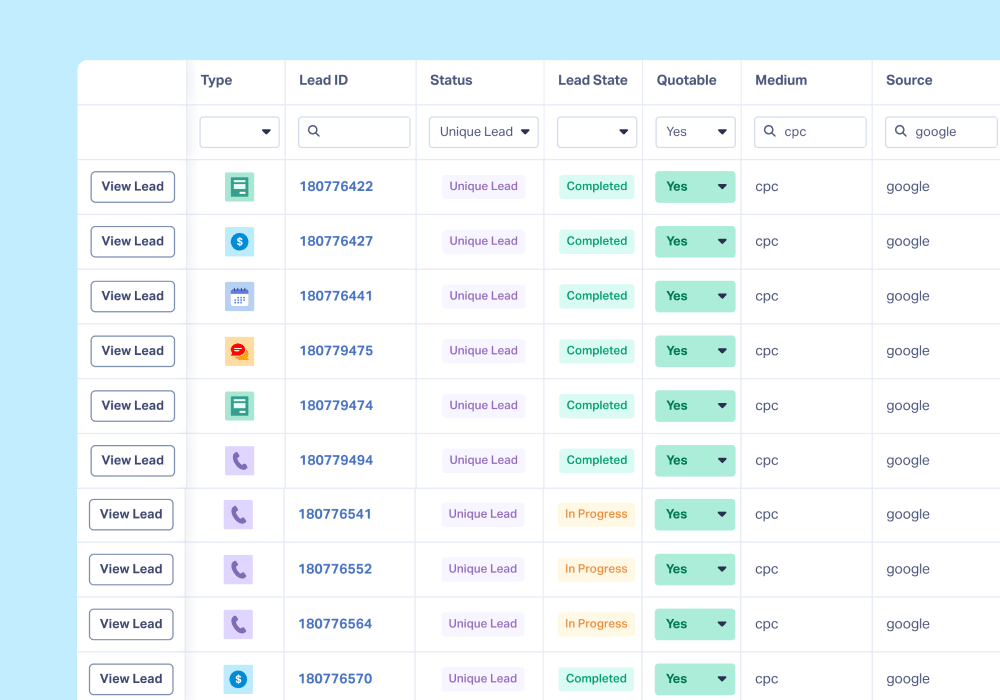
- Qualification and sales value on every lead. Each lead can be marked quotable and assigned a value by hand or automatically through Lead Intelligence (included in the $160/mo Elite plan). Qualification and value are documented alongside source, campaign, keyword, and landing page, so you can filter for "qualified Google Ads calls from new customers" directly in the platform. Invoca can classify call outcomes, but it does that through custom Signals, which are priced separately.
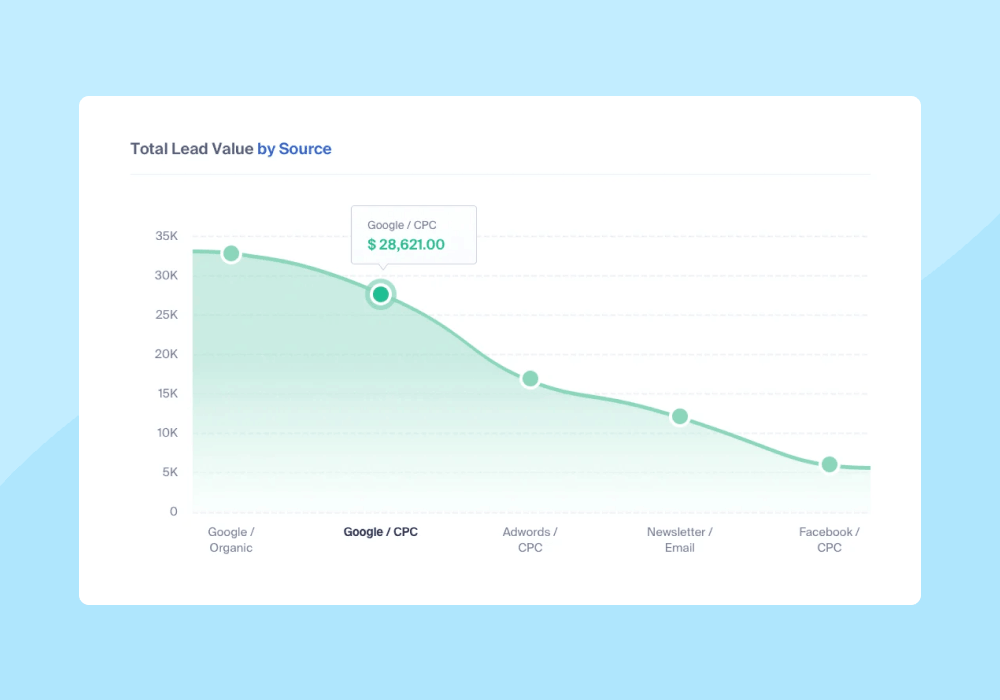
- Custom reports built on lead-level data.Report Builder breaks leads down by any combination of 70+ data points, like revenue by source or quotable leads by keyword. Because reporting covers every tracked lead type, a revenue-by-source report includes forms and chats alongside calls.
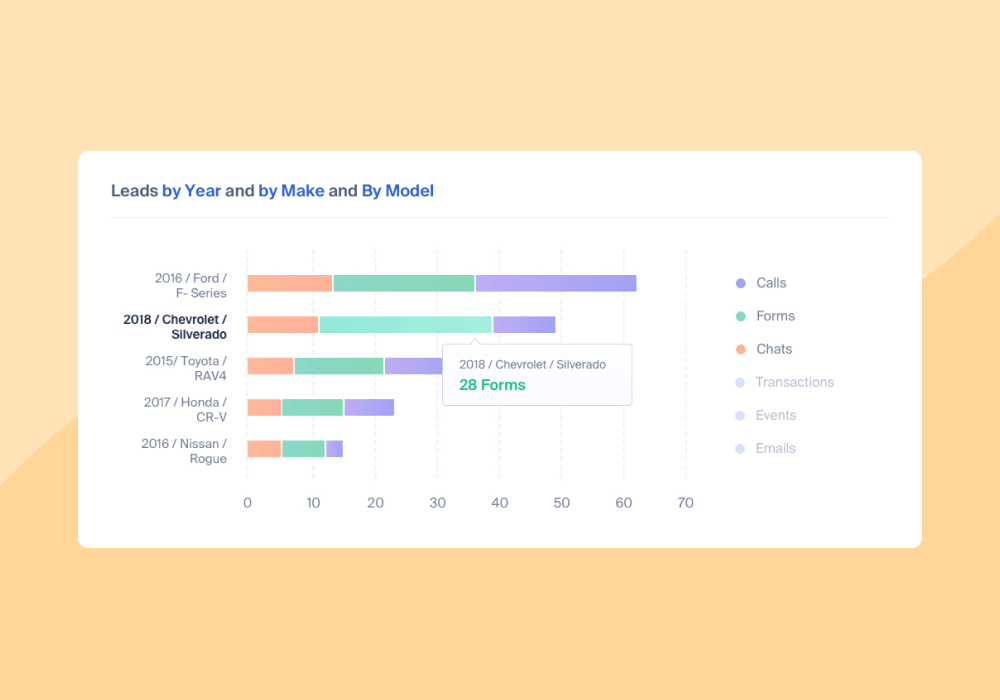
- Calls, forms, and chats in the same report. WhatConverts offers the advanced functionality of a dedicated call tracking platform, while also tracking forms, chats, transactions, and bookings in the same place. Every report breaks results down by lead type, so Leads by Source shows how a channel's leads split across calls, forms, and chats in a single view. Invoca has no native form or chat tracking.
- Transparent pricing designed specifically for marketers and PPC agencies. Each pricing tier consists of a flat monthly fee plus usage fees, with every tier listed on our pricing page. Agency plans cover unlimited tracking accounts, so an agency’s cost doesn’t climb with every client added. Our pricing calculator lets you model what you’ll pay at 10x your current volume without a sales conversation.
Find the Plan That Fits: Compare WhatConverts Plans
- Setup takes minutes, not weeks. Add the tracking script, choose your numbers, and you can be attributing calls from your campaigns in a single afternoon. There’s no implementation project or procurement cycle standing between you and your first tracked call.
Features Overview
- Full-feature call tracking capabilities: DNI; keyword-level tracking; first-, last-, and multi-touch attribution; custom call flows; call recording and transcription; full API access; and GDPR compliance
- Lead Intelligence and AI Analysis: Automatically reviews transcripts to qualify leads and identify buyer intent keywords, so you can separate sales-ready leads from spam without listening to calls
See everything that AI Lead Analysis with WhatConverts can do.
- Customer journey tracking: Follows one lead across sessions and devices from first ad click through conversion, as a single path rather than disconnected touchpoints
- 70+ data points per lead: Including source, medium, campaign, keyword, landing page, product or service, quotable status, quote value, and custom fields
- Report Builder: Templates like Quotable Leads by Campaign and Cost Per Quotable Lead, plus custom reports across any combination of dimensions
- Ad platform optimization: Direct integrations with Google Ads, Meta, and Bing that send qualified conversions back to the bidding algorithm
Drawbacks
WhatConverts is built for marketers tracking leads back to campaigns, not for running a call center. If your requirements are on the operations side, some of what Invoca offers won't be here:
- No AI voice or messaging agents. Invoca offers Nico, an AI agent that engages and qualifies leads over voice and SMS and books appointments, plus a separate AI messaging agent. WhatConverts has no equivalent, since its AI is designed to analyze conversations rather than conduct them.
- Less conversation AI depth than Signal AI. WhatConverts qualifies leads and surfaces intent automatically. It doesn't offer trainable custom models at the level Invoca does. For most marketing use cases that level of advanced functionality isn't needed, but if deeply customized call outcome classification is core to your business (and you have the budget for it), Invoca goes further.
Pricing
WhatConverts uses one flat monthly fee per plan plus usage, with all integrations and compliance settings included at the plan level where they're offered. White labeling is a $50/mo add-on.
Individual Business plans are charged per account. Agency plans include unlimited accounts, so an agency with 10 clients and an agency with 100 clients both pay $500/mo (or $550/mo with white labeling) on Agency Plus.
| Plan | Monthly Price | What's Included |
| Individual Plans (All plans include a $30 usage credit) | ||
| Call Tracking | $30/mo | Phone call and text message tracking, Dynamic Number Insertion, call tracking and recording, API access, and GDPR compliance. |
| Plus | $60/mo | All Call Tracking features plus form and chat tracking, campaign and keyword reporting, and platform integration with Bing, Google Ads, and GA4. |
| Pro | $100/mo | All Plus features plus call flows, custom Report Builder, automatic scheduled reports, and HIPAA compliance. |
| Elite | $160/mo | All Pro features plus Lead Intelligence, customer journey tracking, and multi-click marketing attribution. |
| Agency Plans | ||
| Plus | $500/mo | $250 free usage credit; all call tracking features plus form and chat tracking, campaign and keyword reporting, and platform integration with Bing, Google Ads, and GA4. |
| Pro | $800/mo | $300 free usage credit; all Plus features plus call flows, custom Report Builder, automatic scheduled reports, and HIPAA compliance. |
| Elite | $1,250/mo | $400 free usage credit; all Pro features plus Lead Intelligence, customer journey tracking, and multi-click marketing attribution. |
Key pricing considerations:
- 14-day free trial on all plans, no sales conversation required
- No add-on charges for integrations, HIPAA, or GDPR
- Agency pricing avoids per-account markups as client count grows
2. CallRail (4.6/5): Good Fit for Small and Mid-Sized Businesses That What Basic Tracking
CallRail is one of the most widely used call tracking platforms among small- and mid-sized businesses. It handles the core job (attributing calls to the campaign, ad, and keyword that produced them) and it’s self-serve, so an entry-level plan at $55/mo can have numbers live on the same day with no sales quote and no implementation.
One strong caveat is that the entry price is rarely the price you end up paying with CallRail. White labeling, advanced call flows, premium integrations, and HIPAA compliance are all billed as add-ons, so a configuration matching what WhatConverts includes in its $160/mo plan can cost significantly more with CallRail.
On G2 it scores 9.0 for both Ease of Use and Ease of Setup, with 8.9 for Quality of Support.
Key Differentiators
- Form tracking as well as call tracking. Higher plan tiers include form submissions alongside call and text tracking, which closes part of the lead tracking coverage gap, but not all: there’s still no support for chat, transaction, or appointment booking tracking.
- Rule-based conversation intelligence at a fraction of the cost of Signal AI. CallRail’s transcription and keyword analysis are rule-based rather than trainable models. They’re less powerful than Invoca’s offering, but also significantly more affordable: both come included in Lead Conversion plans and higher, which start at $165/mo.
- Published pricing and self-serve signup. CallRail offers four publicly-available tiers and a 14-day trial with no required sales conversation. Figuring out what your actual costs will be with add-ons can be a bit of a challenge, but it’s significantly more transparent than Invoca’s custom quote-only model.
Features Overview
- Advanced Dynamic Number Insertion (DNI) tracking calls to source, campaign, or keyword
- Multiple attribution models including first-touch, last-touch, and multi-touch
- Customizable call flows for routing by business rules, department, or agent
- Call recording and transcription for quality assurance and customer insight
- Form tracking on Lead Tracking Complete plans and above
- Compliance: HIPAA, GDPR, and SOC2, though HIPAA requires a healthcare account fee
- Integrations: Google Ads, GA4, HubSpot, and 6,000+ tools via Zapier, with Salesforce, Marketo, and other premium connections billed separately
Drawbacks
- Add-on pricing adds up. White labeling ($65/mo), advanced call flows ($15/mo per company), premium integrations ($80/mo per integration), and HIPAA compliance ($150/mo) are all excluded from base plan pricing. Even with many add-ons your CallRail cost likely won’t get close to Invoca’s quote, but it won’t be cheap either.
- No chat or transaction tracking. CallRail covers calls, texts, and forms. Chat, e-commerce transaction, appointment booking, and click event tracking require another tool.
- Lead-level data is limited. CallRail’s Lead Center organizes information by call and by form rather than by person, which makes multi-device and multi-session journeys hard to follow.
- API doesn’t work with custom fields. You're limited to the fields CallRail ships with, so details like product interest or appointment status can’t be imported.
Pricing
All plans have a base monthly fee plus usage charges for additional calls and minutes. Users who are willing to commit to a year-long contract can get 10% off of plan costs.
| Plan | Price | What’s Included |
| Lead Tracking | Starts at $55/mo for five numbers and 250 minutes, up to $295/mo for 40 numbers and 4,000 minutes plus additional usage | Includes basic call tracking features like DNI, keyword-level attribution, and standard reporting. Available at four different plan levels, each offering different amounts of included local numbers and local minutes, text messages, and usage pricing. |
| Lead Tracking Complete | Starts at $105/mo for five numbers, 250 minutes, and 1,000 form submissions plus additional usage | Adds form tracking along with call and text tracking; prices increase with additional numbers and minutes. |
| Lead Conversion | Starts at $165/mo for five numbers and 250 minutes plus additional usage | These plans add conversation intelligence, which allows for call transcription and keyword analysis. You can also opt for Premium Intelligence to unlock call transcription summaries and conversation sentiment and analysis. |
| Lead Conversion Complete | Starts at $215/mo for five numbers, 250 minutes and 1,000 forms plus additional usage | This plan combines all the features from every plan into one, meaning it offers everything in Call Tracking as well as call transcription, keyword analysis, form tracking, and access to the custom form builder. |
Key Pricing Considerations
- Several features require paid add-ons
- HIPAA compliance is charged per account
- Usage-based billing makes costs less predictable as call volume grows
3. CallTrackingMetrics (4.5/5): Best for Call Center Features Without an Enterprise Contract
If part of what drew you to Invoca was the contact center side (live call handling, agent coaching, routing) CallTrackingMetrics delivers most of that at published prices you can sign up for directly.
It's the closest thing on this list to a replacement for Invoca's call center functionality, minus the enterprise pricing and the implementation timeline.
On G2, it scores 8.6 for Ease of Use, 8.4 for Ease of Setup, and 9.0 for Quality of Support.
Key Differentiators
CallTrackingMetrics’s approach differs from Invoca’s in a few ways:
- Phone system built into the platform. Unlike Invoca, which doesn’t include a softphone or dialer, CallTrackingMetrics’s Sales Engage plan allows calls to be answered, placed, monitored, and routed inside the platform itself.
- Rule-based call scoring rather than trained models. Invoca’s Signal AI is trained on a company’s own call data to recognize outcomes. CTM scores calls using criteria the user defines (length, keywords, outcomes) which is faster to configure but limited to the rules that are specified in advance.
Features Overview
- Standard tracking features including DNI, keyword-level attribution, recording, and transcription across calls, texts, and forms
- Lead routing and distribution by agent skill and availability
- Advanced call scoring on custom criteria
- Real-time call monitoring to listen live, whisper-coach agents, or join a conversation
- Built-in softphone for inbound and outbound calls directly through the platform
- Tiered integrations: Google Ads and GA4 on every plan; HubSpot, Meta, and Yext at Marketing Pro and above; Salesforce, Zoom, and Calendly on Sales Engage
Related Reading: CallRail vs CallTrackingMetrics vs WhatConverts: In-Depth Comparison
Drawbacks
- Steeper learning curve. The softphone, coaching tools, and scoring rules mean more to configure than an attribution platform. If you don’t need the call center side, it’s unnecessary setup work.
- AI features are billed per use. AskAI, transcription, and VoiceAI are charged on top of the base plan, so conversation intelligence costs aren't fixed or 100% predictable.
- Enterprise pricing is steep. CTM makes most of its features available at lower tiers, but those who do require enterprise level will pay nearly $2,000/mo before usage costs.
Pricing
CTM offers four plan tiers starting at $79/mo plus usage. Agency relevant capabilities (form tracking, white labeling, sub-accounts, premium integrations) require a Marketing Pro plan, and call center features require the Sales Engage tier. Users can get meaningful discounts with annual or multi-year prepaid rates.
| Plan | Monthly Price | What’s Included |
| Marketing Lite | $79/mo | Call and text tracking, call recording and call flows, and integrations with Google Ads and GA4. |
| Marketing Pro | $179/mo | All Marketing Lite features plus form tracking, call transcription, AI call analysis, premium marketing integrations (like HubSpot, Facebook, and Yext), and HIPAA/GDPR compliance. |
| Sales Engage | $329/mo | All Marketing Pro features plus VOIP softphone, AI answering, intelligent call routing, and premium sales integrations (like Salesforce, Zoom, and Calendly). |
| Enterprise | $1,999/mo | All Sales Engage features plus dedicated account management team, and volume-based pricing for AI functionality and add-on enhancements. |
Key Pricing Considerations
- AI features billed per use on top of the base plan
- Annual and two-year prepay meaningfully lower the effective monthly rate
Frequently Asked Questions
How much does Invoca cost?
Invoca doesn't publish pricing. Brand and agency plans are available at Pro, Enterprise, and Elite tiers, with separate Performance Professional and Performance Enterprise tiers for pay-per-call programs. Every plan requires a custom quote, and contracts are typically annual. Signal AI, PreSense, AI-Powered Quality Management, advanced IVR, and premium integrations are priced separately on top of the base plan at every tier.
Does Invoca track form submissions?
Invoca has no native form tracking. It's built around tracking phone calls. You can push web conversion events into the platform through its Conversion Reporting API, but that's a developer integration rather than a form tracking feature; there's no form capture, chat tracking, or e-commerce tracking in the product. Marketers who need to attribute form fills and chats alongside calls typically use WhatConverts, CallRail, or CallTrackingMetrics instead.
What is the cheapest Invoca alternative?
WhatConverts starts at $30/mo for call tracking and $60/mo for calls, forms, and chats. CallRail starts at $55/mo, and CallTrackingMetrics at $79/mo. All three publish pricing, which Invoca doesn't, so they're good options where you can compare costs without a sales conversation.
Is Invoca better than CallRail?
They're built for different buyers. Invoca has deeper conversation AI and enterprise compliance, and it calculates partner payouts for pay-per-call programs. CallRail is cheaper, self-serve, faster to set up, and tracks forms alongside calls. For a large contact center, Invoca is the stronger platform. For a small or mid-sized business attributing marketing campaigns, CallRail does the job for a fraction of the price.
What is Invoca's Signal AI, and is it included?
Signal AI is Invoca's conversation intelligence suite, letting you train custom AI models to detect specific call outcomes. It's a paid add-on at every tier — Pro, Enterprise, and Elite — rather than being included in any base plan. Tiers differ in how many custom Signals they allow: 5 on Pro, 50 on Enterprise, and 100 on Elite.
Do I need Invoca if I just want to track calls from Google Ads?
Probably not. Attributing calls to campaigns and keywords is standard functionality across every platform in this category, including ones starting at $30/mo. Invoca's differentiators — trainable conversation AI, agent-facing tools, partner payout calculation, enterprise compliance — sit outside what a Google Ads attribution use case requires.
Wrapping Up
Invoca is the right platform for a narrow set of businesses: large call centers in regulated industries, and pay-per-call operations that need partner payouts calculated call by call. If that's you, the price and the implementation are worth it.
If you're a marketer trying to prove which campaigns generate revenue, you're paying for depth in places you won't use, and going without form, chat, and transaction tracking in the places you will.
The three alternatives worth comparing:
- WhatConverts: Best for PPC marketers and agencies who need every lead type in one place
- CallRail: Good fit for small and mid-sized businesses that want basic call and form tracking
- CallTrackingMetrics: Best for teams that need call center features without an enterprise contract
Ready to see every lead your marketing generates, not just the calls?
Start your free 14-day trial of WhatConverts today or book a demo with a product expert to see how we help prove and grow your ROI.
Get a FREE presentation of WhatConverts
One of our marketing experts will give you a full presentation of how WhatConverts can help you grow your business.
Schedule a DemoGrow your business with WhatConverts







